Budgets & goals
Your monthly plan, budgets and envelopes
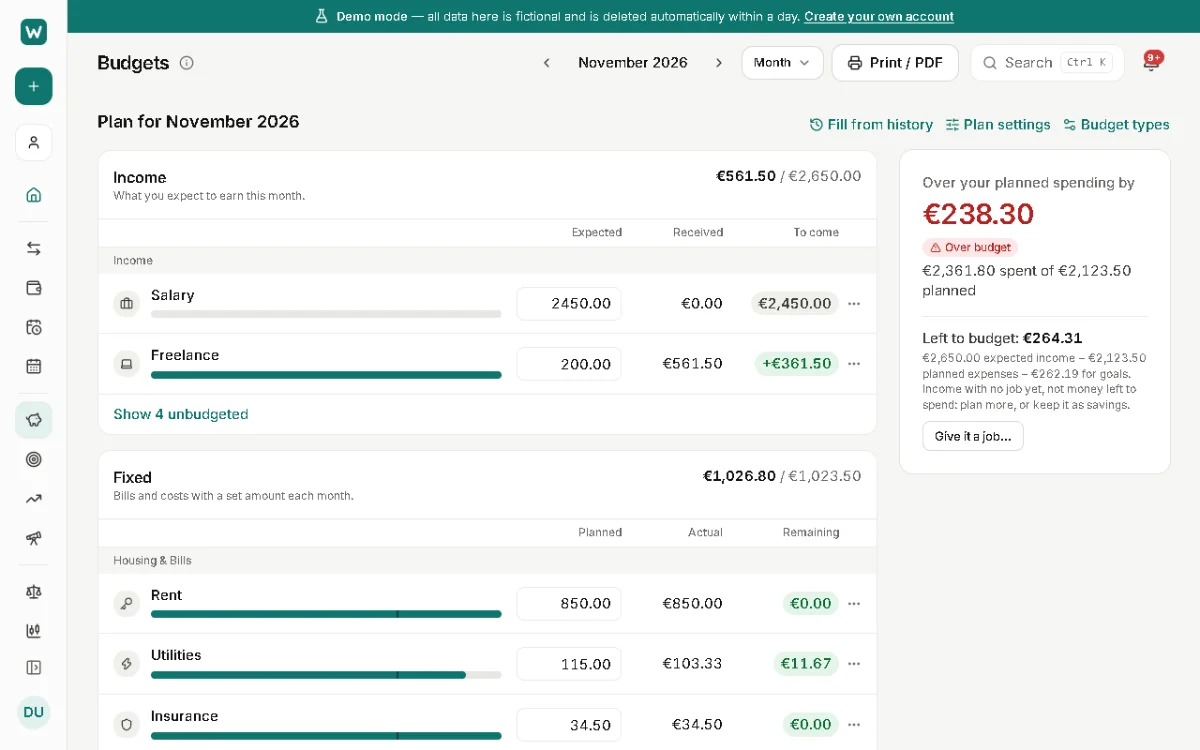
The budget plan answers one question: how much can I still spend this month? It splits the month into what you earn, bills that don't change, everyday spending and costs that don't come every month.
Where to find it: Budgets
The four parts of the plan
Income is what you expect to earn this month. Fixed holds bills with a set amount, each with its own line. Flexible is one budget for everyday spending, shared by your flexible categories and anything not categorized yet. Non-monthly is for irregular costs like travel or yearly fees: what you don't spend rolls over to next month.
Which part a category belongs to is its kind (Fixed, Flexible or Non-monthly), set on the Categories page. See Categories and rules.
Filling in the plan
Left to budget is planned income minus planned expenses and goal contributions. When it reaches zero, all of your income is planned. Home then shows what's still available to spend this month.
- Open Budgets and enter what you expect for each income and fixed line.
- Set the Flexible budget: one amount for everyday spending.
- Give non-monthly categories a monthly amount, for example a twelfth of a yearly fee.
- Or use Fill from history to start from what you actually spent in past months, and adjust.
Extra limits and envelopes
Below the plan, Extra limits & envelopes are optional: an overall monthly spending limit, a limit over any set of categories, or envelopes you fill each month. For an envelope you assign an amount each month; what's available is what you assigned plus what rolled over, minus what you spent.
They track spending inside your plan and don't change Left to budget. Create one with New budget.
Months and years ahead
The plan can change from month to month. The year and decade views show the plan for many months at once, with each year's totals.
Updated 22 November 2026
About this feature: Budget planner